Skip to content
Windows desktop · Local redaction and restoration

Protect your sensitive information before sharing with AI.

Preserve useful context with meaningful labels.

Automatic redaction starts the job. Scan Review words for possible misses, check the exact Preview, and copy only what you approve. Bring the AI reply back and Restore matching originals locally.

Core text detection and restoration run on your device. No GoBauer account required.

The goal is to keep sensitive details out of the AI prompt. Detection can miss them, and surrounding context can still be sensitive. Review the complete text before sharing.

1 · Source

Paste your text and see detected details highlighted.
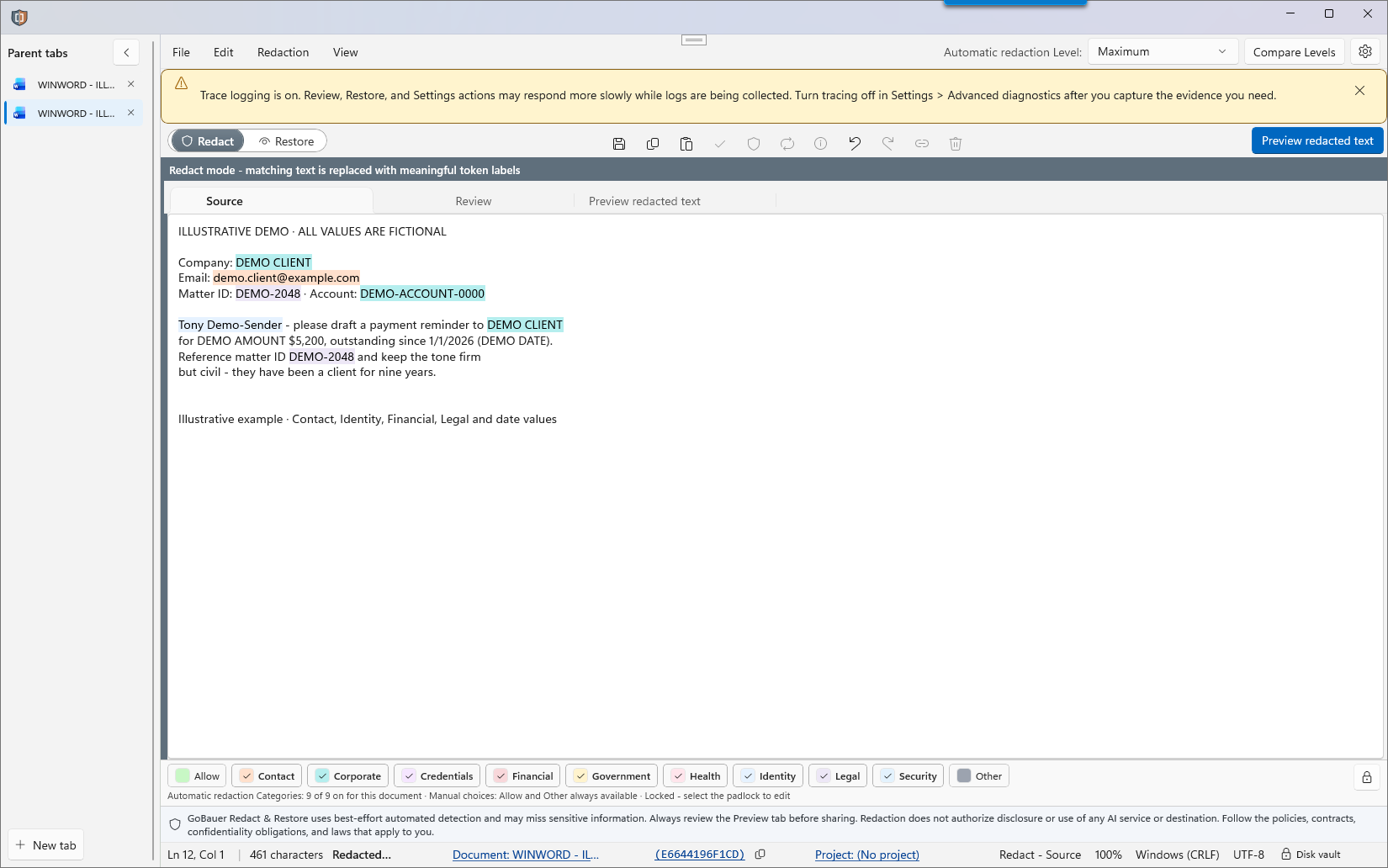
Source tab with company, email, mailing address, and account details highlighted for redaction in fictional sample text.

2 · Review

Review the results and check values that need attention.
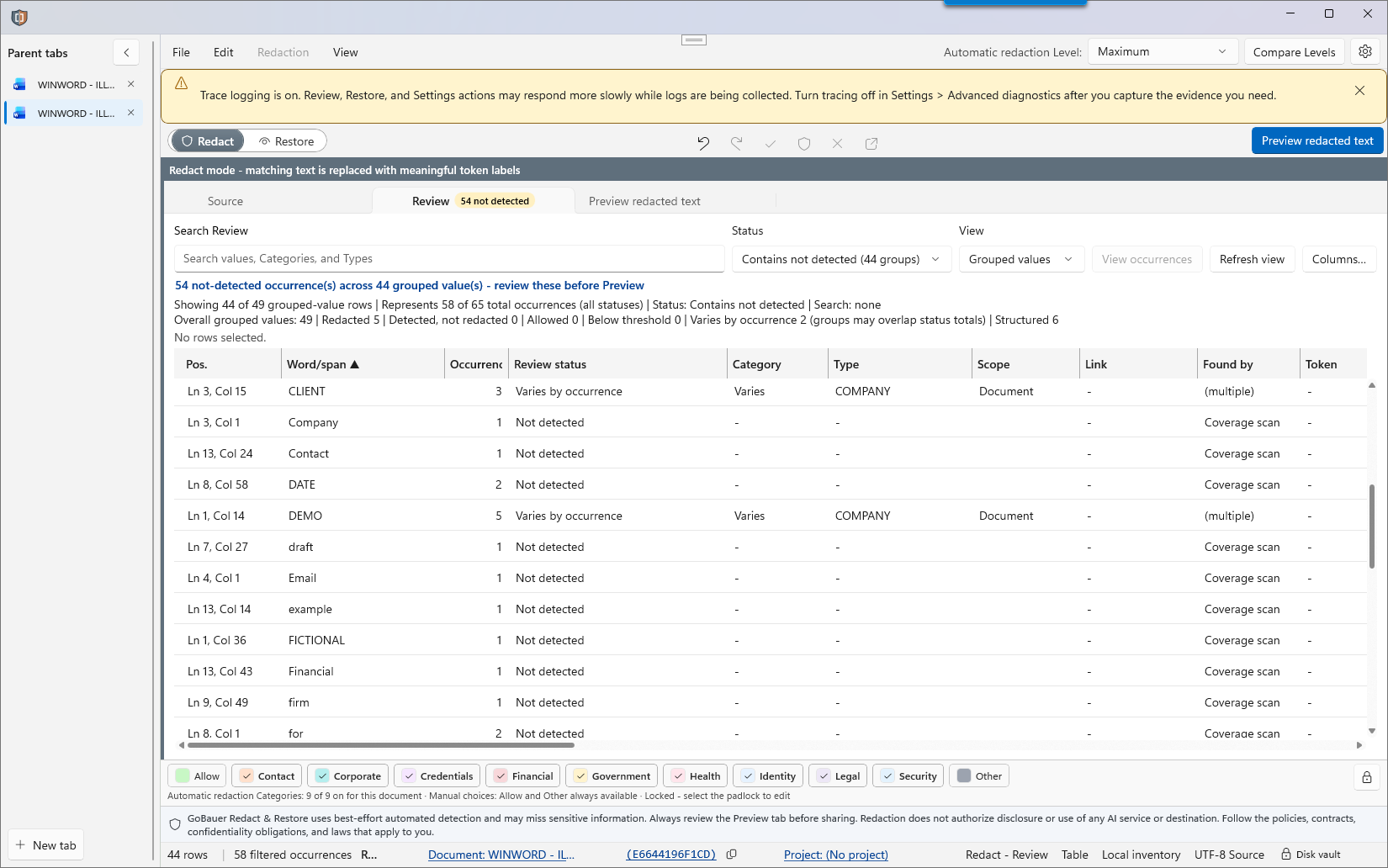
Review tab listing grouped words and values, including not-detected items, with status, category, type, and occurrence columns.

3 · Preview

Check the redacted text before copying it to an approved destination.
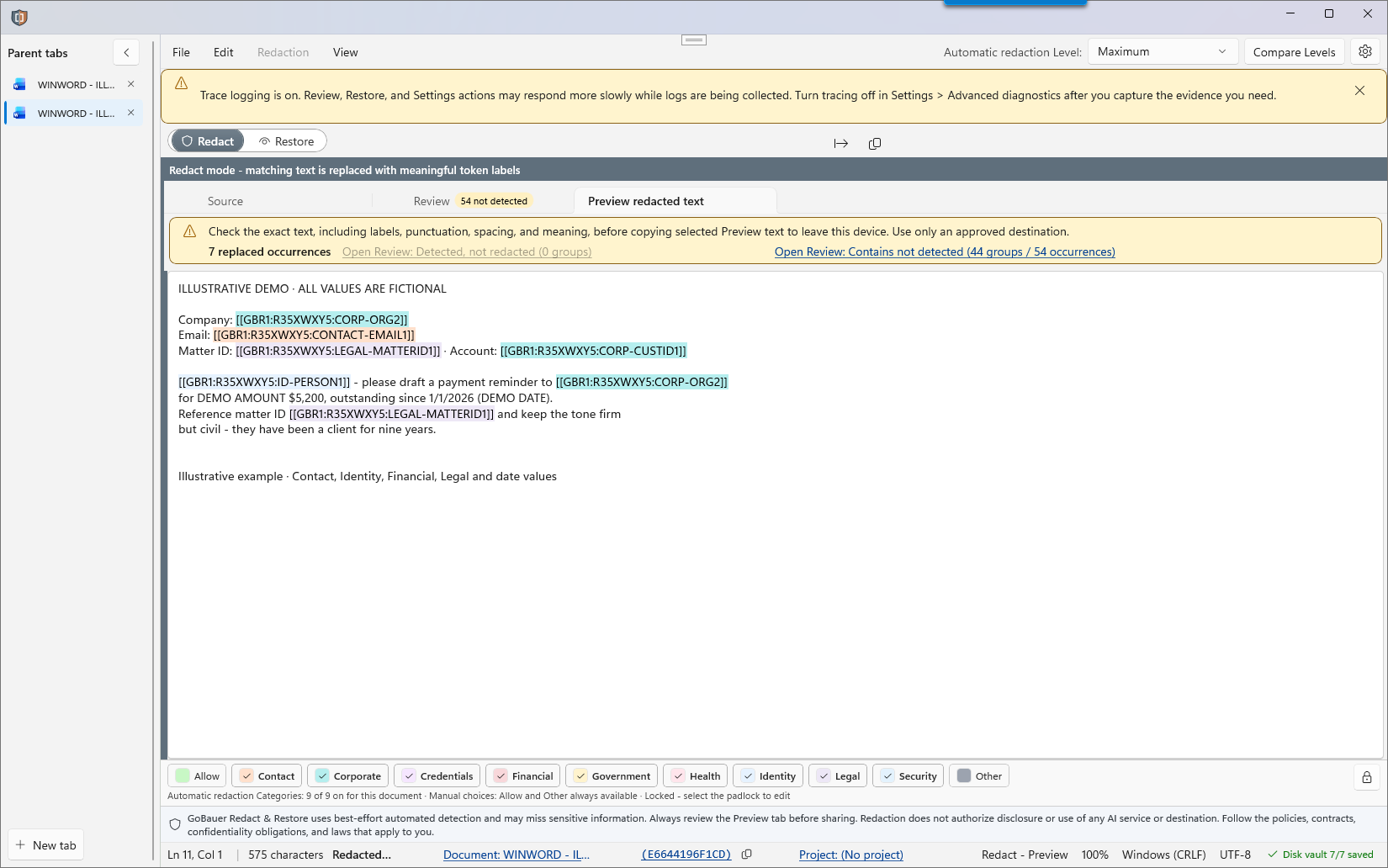
Preview tab showing meaningful replacement tokens in fictional text and a reminder to check the result before copying.

Source → Review → Preview · Select a screen to view full size.

Why prepare text first

A rushed paste can share details the task does not need.

A utility-bill comparison or approved work summary may need selected facts and relationships, but not the original names, addresses, or account references. Replacing them by hand takes time. GoBauer Redact & Restore starts with local detection, lets you scan Review words for possible misses, and shows the exact Preview before copying. For work or school, follow your organization's AI-use and data-sharing rules and any confidentiality requirements. For personal use, review the AI service's privacy and retention settings and protect other people's information.
The workflow

Four steps, with review at each stage.

Paste selected text for local analysis. Review and correct the proposed replacements, inspect the exact outbound Preview, use an approved destination, and restore matching labels on your device.
STEP 01

Bring in selected text

Paste it into Redact & Restore, or drag-and-drop or import a supported text file or a PDF with readable text. This prepares the selected text; it does not change or sanitize the original document.
STEP 02

Review the replacements

Use Review and sort by words, including filtering for Not redacted, to scan for possible misses. Correct detected spans, missed values, and label types before Preview.
STEP 03

Check and share

Review the complete text and meaningful labels in Preview before copying to an approved destination. Look for sensitive meaning in the remaining context, not just direct identifiers.
STEP 04

Restore locally

Bring the labeled reply back, restore matching values using your local record vault, and review the finished draft. Keep those records available until Restore is complete. Use restored text only in a destination authorized to receive the original data.

Prepare text before sharing it

Prepare text before placing originals into an AI interface. Some upload workflows can process a file before you submit the accompanying message. Review the destination's behavior and share only the information it is authorized to receive.
Local processing and records

Preparation and restoration happen on your device.

GoBauer's core text detection and restoration run locally. Your selected text is not sent to a GoBauer service for analysis. Your chosen AI service handles the text you decide to share with it.

Detection runs locally

Rules, recognizers, and the bundled person-name model analyze selected text on your device. Detection level, enabled rules, and your corrections affect the result.

Choose how to keep records

Choose session memory or encrypted local storage for the records covered by that setting. Restore depends on keeping matching records. In memory-only mode, use Exit to end the working session; closing the window may leave the app running.

Source details are optional

Optional source observation uses the foreground application and the Windows window title to suggest source names. It does not read clipboard text in the background or inspect browser address fields or history. Window titles can still contain sensitive information.
Automated detection can miss sensitive information. Review the final text and use only a destination authorized to receive it. Redaction does not grant permission to share.
Protect the complete workflow

Review what remains, as well as what you replace.

Control the whole exchange: minimize the prompt, inspect what remains, use approved AI settings, protect local Restore records, and review the reply and restored draft. Replacing identifiers does not erase sensitive meaning in the text that remains.

Your approved destination

Use GoBauer within your organization's approved workflow. Replacing identifiers does not grant permission to share the remaining content or change its classification.

Manage copies after the task

Apply your organization's and the AI service's retention controls to the conversation, any uploads, and local copies. Remove copies when permitted and no longer needed. GoBauer cannot delete content held by an external AI service.

Review both outputs

Review outgoing text for identifiers and confidential context. Review the restored draft for incorrect recipients, altered meaning, and misplaced values.
See what Restore adds

Prepare the text. Bring the details back.

A fictional utility bill review, from Source through Restore.
Original local text: Compare these charges and draft a question to Example Electric. Account holder: Mara Ellis (mara.ellis@example.test). Service: 48 Example Lane. Account: EX-48291. July: 620 kWh, $146.20. August: 780 kWh, $198.40. Keep GoBauer labels unchanged in your reply.
Reviewed text shared with AI
Compare these charges and draft a question to Example Electric. Account holder: [[GBR1:R7K4M2Q9:ID-PERSON1]] ([[GBR1:R7K4M2Q9:CONTACT-EMAIL1]]). Service: [[GBR1:R7K4M2Q9:CONTACT-ADDRESS1]]. Account: [[GBR1:R7K4M2Q9:OTHER-ACCOUNTID1]]. July: 620 kWh, $146.20. August: 780 kWh, $198.40. Keep GoBauer labels unchanged in your reply.
Illustrative AI reply
August cost $52.20 more (35.7%) while usage rose 160 kWh (25.8%). Dear Example Electric, please explain rate or fee changes for account [[GBR1:R7K4M2Q9:OTHER-ACCOUNTID1]] at [[GBR1:R7K4M2Q9:CONTACT-ADDRESS1]] between July and August. Please reply to [[GBR1:R7K4M2Q9:CONTACT-EMAIL1]]. Thank you, [[GBR1:R7K4M2Q9:ID-PERSON1]].
After local Restore
August cost $52.20 more (35.7%) while usage rose 160 kWh (25.8%). Dear Example Electric, please explain rate or fee changes for account EX-48291 at 48 Example Lane between July and August. Please reply to mara.ellis@example.test. Thank you, Mara Ellis.

Fictional data and illustrative labels. Actual labels depend on your Review decisions and local records. Keep the labels intact in the AI reply, then verify the arithmetic, wording, and restored values before using the draft.

Availability

GoBauer Redact & Restore for Windows.

Coming soon to the Microsoft Store. Planned at launch: free redaction, a seven-day trial of paid features, and a one-time upgrade with no subscription. The release feature comparison will explain Restore, saved records, and what remains available after the trial.
A corporate purchase option will also be available through Microsoft. Pricing and license terms will accompany the offers.
For organizations

A practical step in your approved AI workflow.

Give staff a repeatable way to review selected text, replace unnecessary identifiers, and restore matching values locally. GoBauer can complement enterprise DLP and support approved workflows in organizations building a baseline without it.

Keep your existing controls

Review the remaining content
Keep classification and destination controls in place. Identifier replacement may reduce matches against some DLP rules while confidential substance remains. A GoBauer token is not a reason to bypass a policy or downgrade a classification.

Tokens provide context

Interpret logs with care
A recognizable token in an existing log can be an observational clue. Its presence is not proof of complete review or compliance, and its absence does not prove nonuse. Your logging configuration determines whether any relevant text is recorded.
# Illustrative GoBauer token prefix \[\[GBR\d+: # Example label, not proof of review [[GBR1:R7K4M2Q9:ID-PERSON1]]
GoBauer prepares text you bring into the application. Email and files fetched directly by an AI connector follow a separate path. Review connector permissions, actions, oversight, and stop controls independently.
Contact us about organizational use
Questions, answered

A few things worth knowing.

Does GoBauer read my browser address bar?

No. Optional source details use the foreground program name and the window title supplied by Windows to suggest a document name. A browser's window title may contain a page title or account name. Source capture does not inspect browser address fields or browser history. These details are a hint, not proof of where copied text originated.

Does it read my clipboard in the background?

Clipboard text is read when you choose an action such as paste or open copied text. If you separately enable Remember source when you copy, GoBauer can temporarily remember the foreground program and window title when the clipboard changes, including while the app is hidden. That background operation does not read clipboard text.

Can I recover the originals later?

Restore requires recognizable labels, matching authorized local records, and any required Windows protection context. Deleting or losing those records can prevent restoration. Review restored values and their placement before using the result.

Does local AI mean the app controls other programs?

No. The bundled local model supports person-name detection in selected text. It does not inspect a browser or control other applications. Detection can miss information, so review the result.

Is this a document sanitization tool for court filings?

No. GoBauer is designed for AI prompts, chat and text-sharing workflows. It is not built for court filings, public-record productions or discovery, which require removal of hidden document content and metadata. Tokenization is not the same as anonymization or legal de-identification.

Is this redaction or pseudonymization?

GoBauer replaces selected spans with labels and can restore matching values from separately held records. This reversible process is pseudonymization. Confidential or identifying information can remain in the surrounding text.

Will AI understand the labels?

AI can often use consistent labels to follow roles and relationships while helping with wording. It does not know the hidden values. Review the AI reply and locally restored draft before use; a label can be altered or put in the wrong place.

Spend less time replacing and retyping details.

See how preparation and local Restore fit your everyday writing workflow.
See how it works
Built for Windows.